Only the safe items are ticked
Caches and logs that apps rebuild on their own are pre-selected. Your downloads, large files and duplicates never are: you choose every one yourself.
Let your computer breathe.
Cleanup and maintenance for your Mac, with protection to follow. Every step explained, every removal undoable.
In development: macOS first, Windows later
Ferah frees up space, keeps your Mac maintained and explains every item before anything is removed. Everything goes to quarantine first, so every cleanup can be undone.
No scare tactics. No inflated numbers.
01/12Cleanup
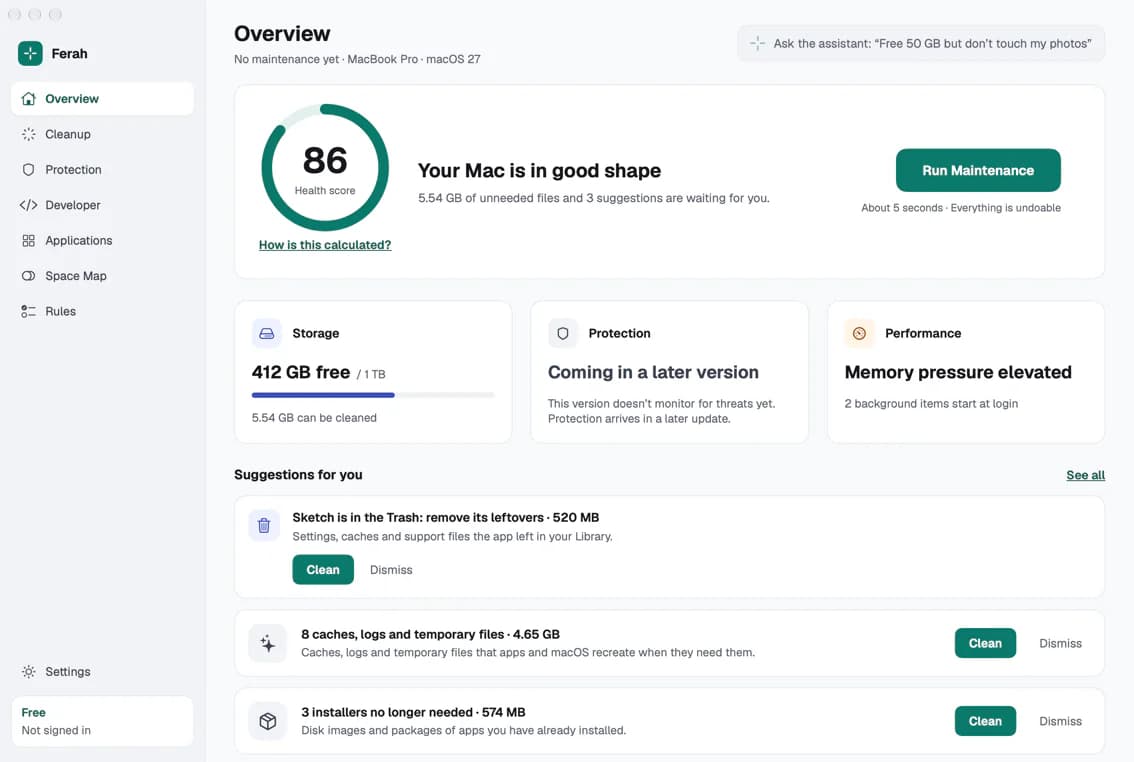
Every item says what it is, and what happens if you remove it.
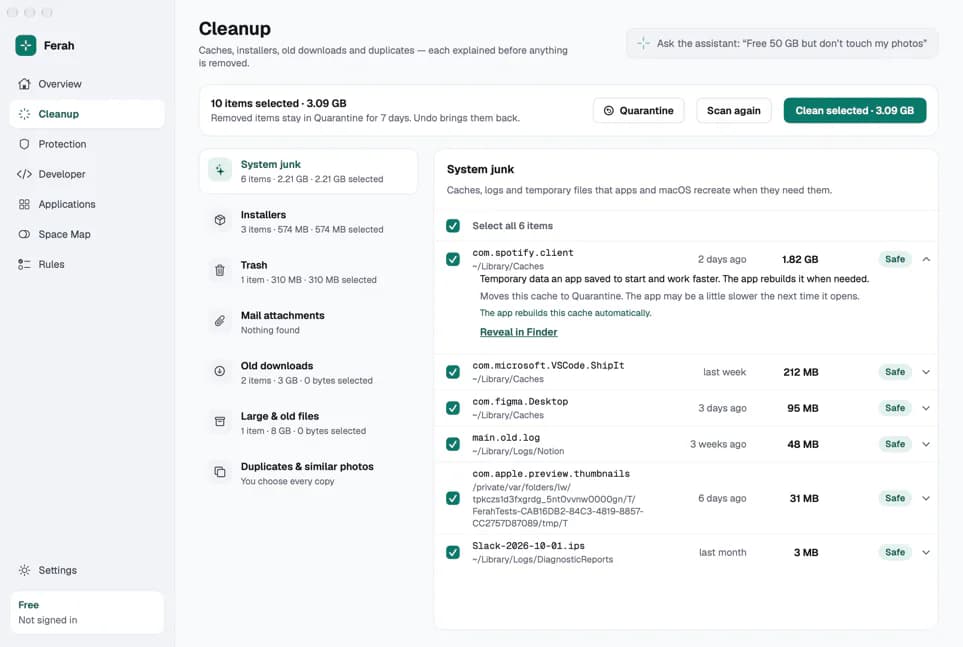
Ferah looks through the places where unneeded files pile up and sorts them into clear categories. Open any item to read what it is, why it is there and what removing it means, before anything moves.
Caches and logs that apps rebuild on their own are pre-selected. Your downloads, large files and duplicates never are: you choose every one yourself.
Your Photos library, iCloud files that are not downloaded, files an app has open and the folders macOS protects are never touched.
Only the copies of attachments on your Mac are offered. Nothing changes in your mailbox.
02/12Quarantine & undo
Every removal goes to quarantine first.
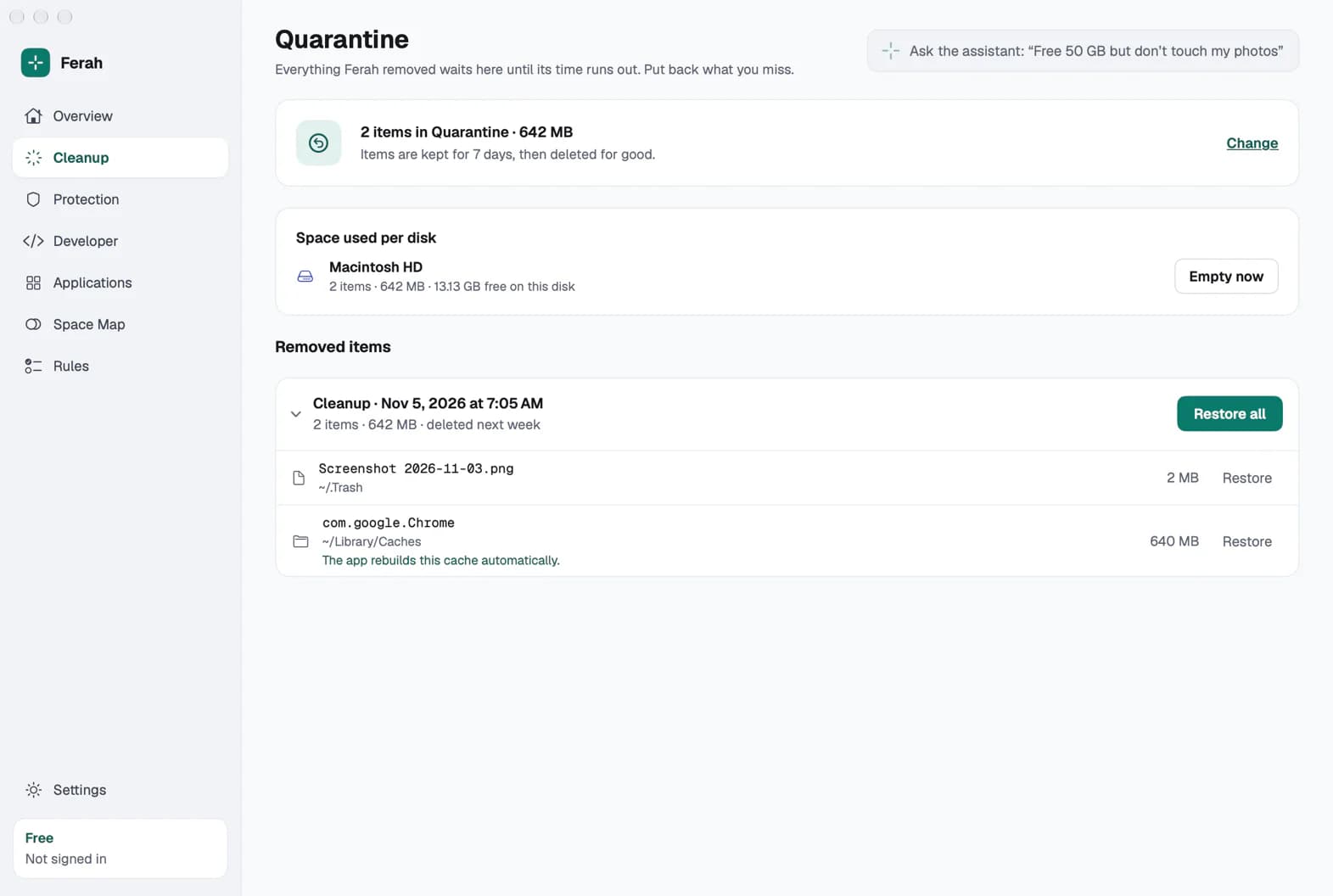
Whatever Ferah removes waits in quarantine on the same disk, for 7 days unless you choose otherwise. Put back a single item or a whole cleanup with one click. Only when its time runs out is it deleted for good.
Restore one item or a whole session, back to where it was. The Quarantine screen shows what is kept, how big it is and when it goes.
A removed project folder keeps the command that rebuilds it, such as npm ci, so you know how to get it back without restoring.
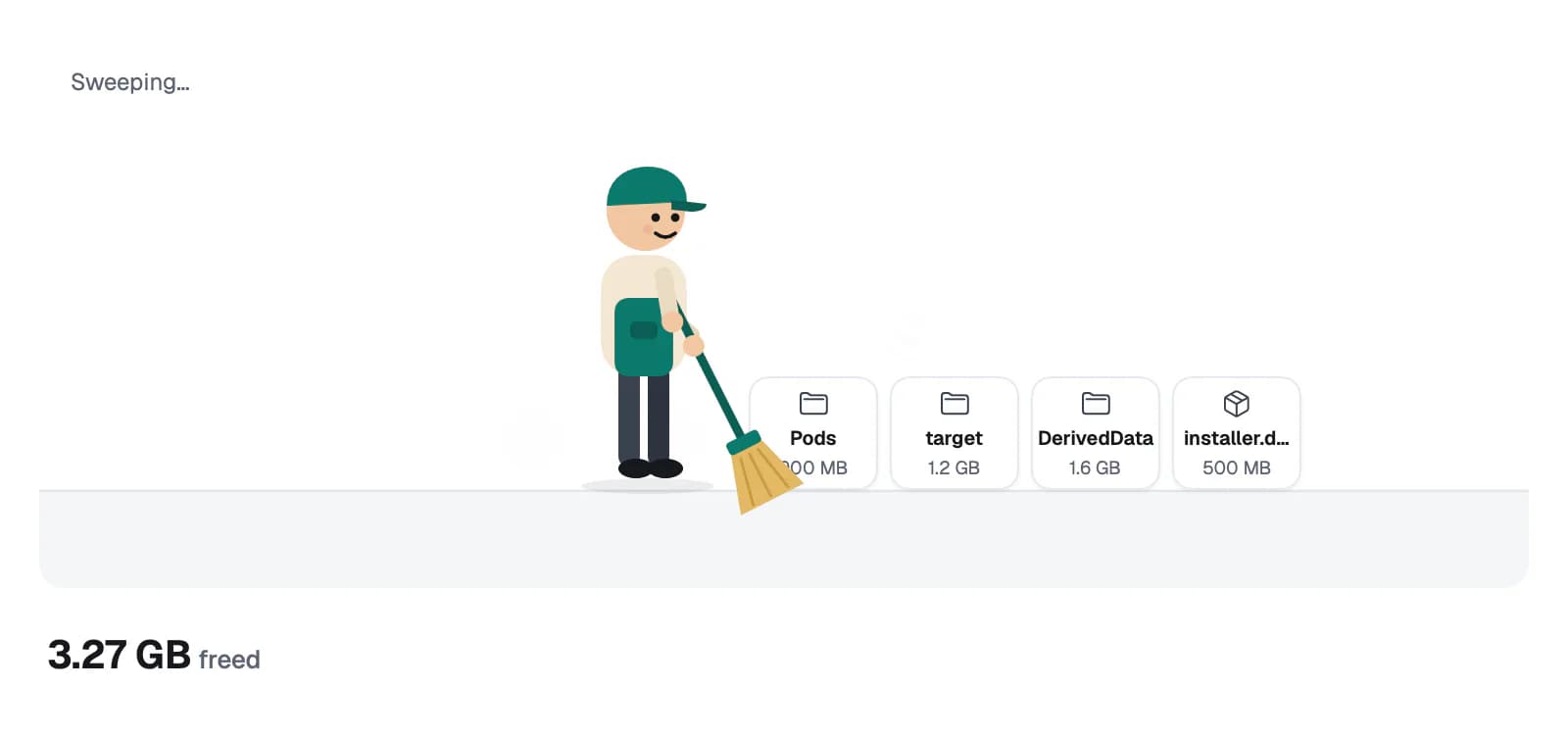
A small character with a broom sweeps removed files away with a soft swish. Click to skip it. With Reduce Motion on, the files simply fade out.
03/12Maintenance
And a health score that shows its working.
Press Run Maintenance and Ferah looks again, then removes the safe, pre-selected items and whatever has been in the Trash for more than 30 days. It tells you how long it will take, and everything it does can be undone.
A score from 0 to 100, built from free space, memory pressure and the items that start with your Mac. A part that cannot be measured yet is left out, never guessed.
Each part has a fixed weight: storage 30, protection 25, security findings 20, memory pressure 15 and startup items 10. Protection and security findings arrive with the protection features; until then their weight is shared among the other parts. The app shows the same breakdown.
When an installer has done its job, an app goes to the Trash, an Xcode archive finishes, Docker quits, macOS updates or the disk runs low, Ferah offers one short card. At most 3 a day, and Quiet Mode holds them all.
04/12Applications
No leftovers, and no downloads from unknown places.
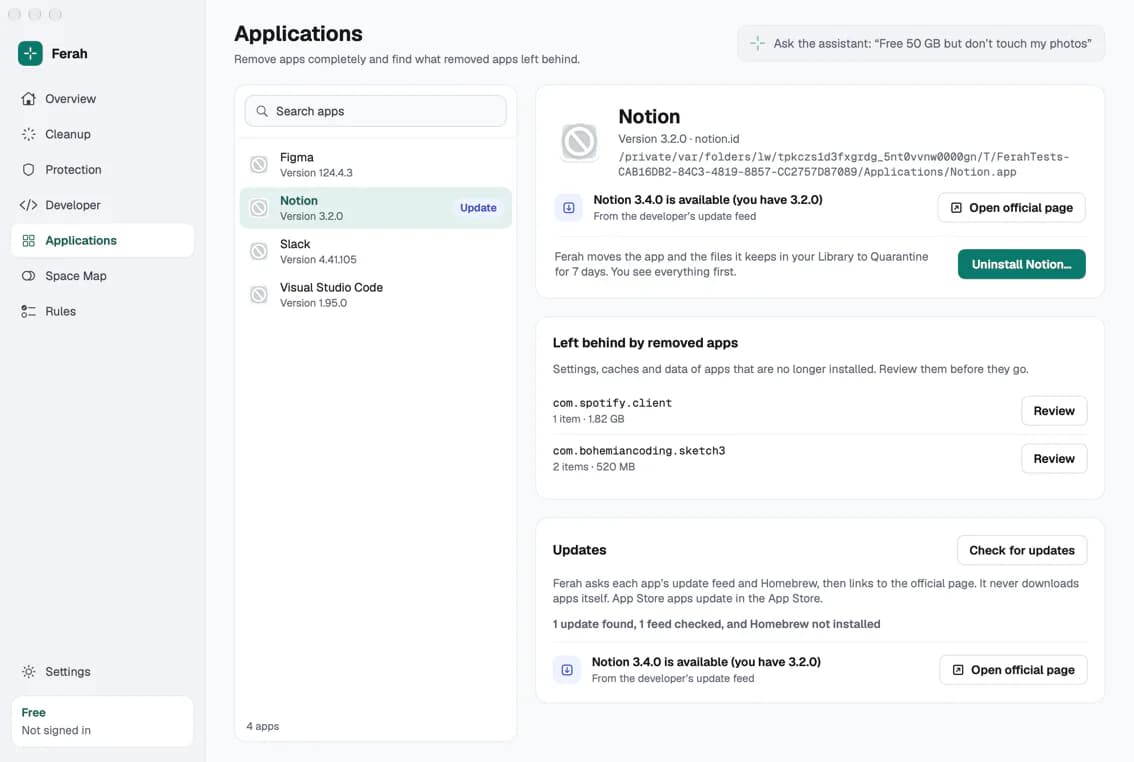
Remove an app together with its preferences, caches, containers, launch agents and login items. Ferah also finds what apps you deleted long ago left behind.
When you ask, Ferah checks each app's update feed and Homebrew, then links to the developer's official page. It never downloads apps itself; App Store apps update in the App Store.
05/12Space Map
Your disk as a map, one click deeper at a time.
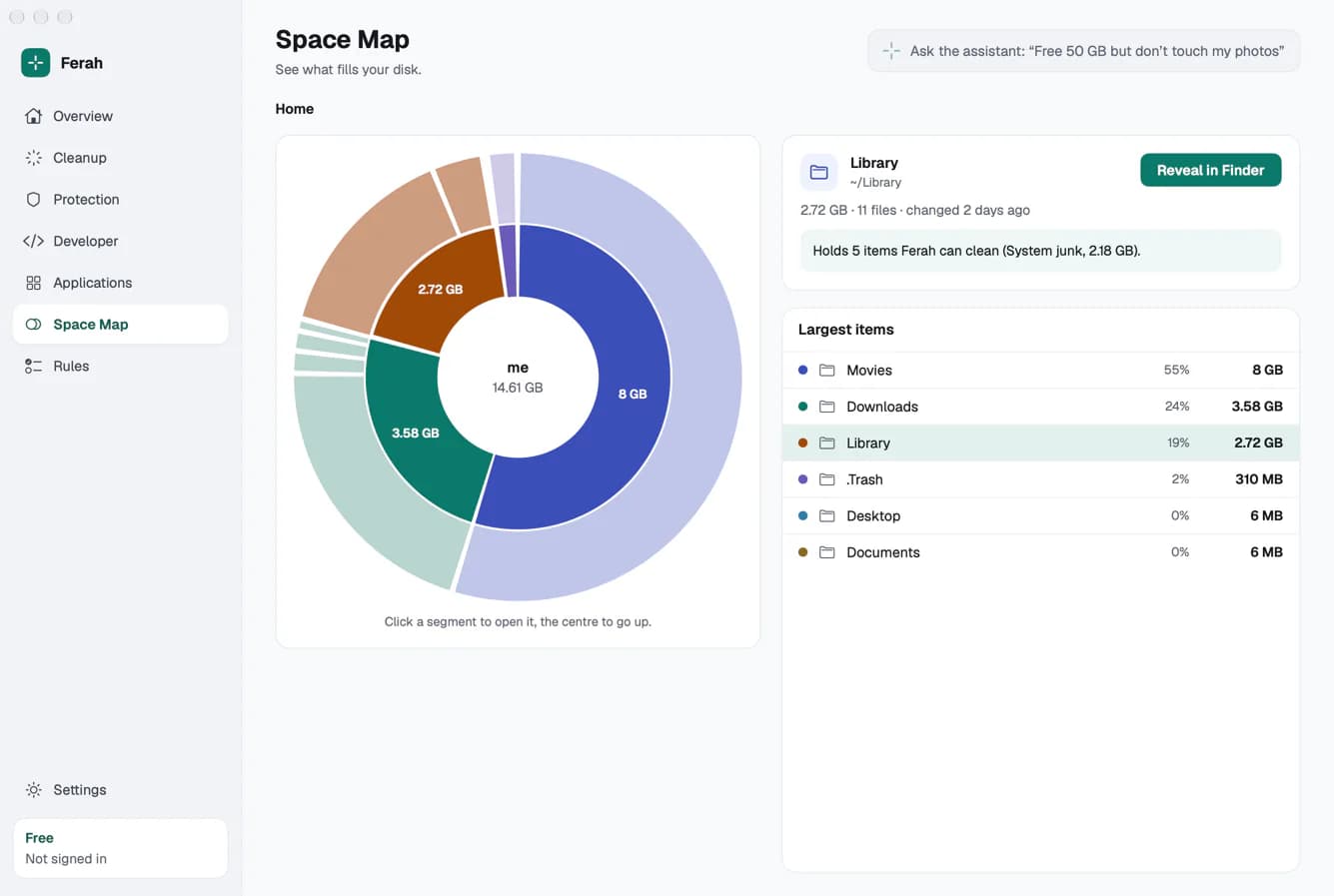
Space Map draws your disk as rings you can open, with sizes on every piece and the largest items beside them. Select an item to see what Ferah can clean inside it, or reveal it in Finder.
06/12Developer
Clean what your builds can make again.
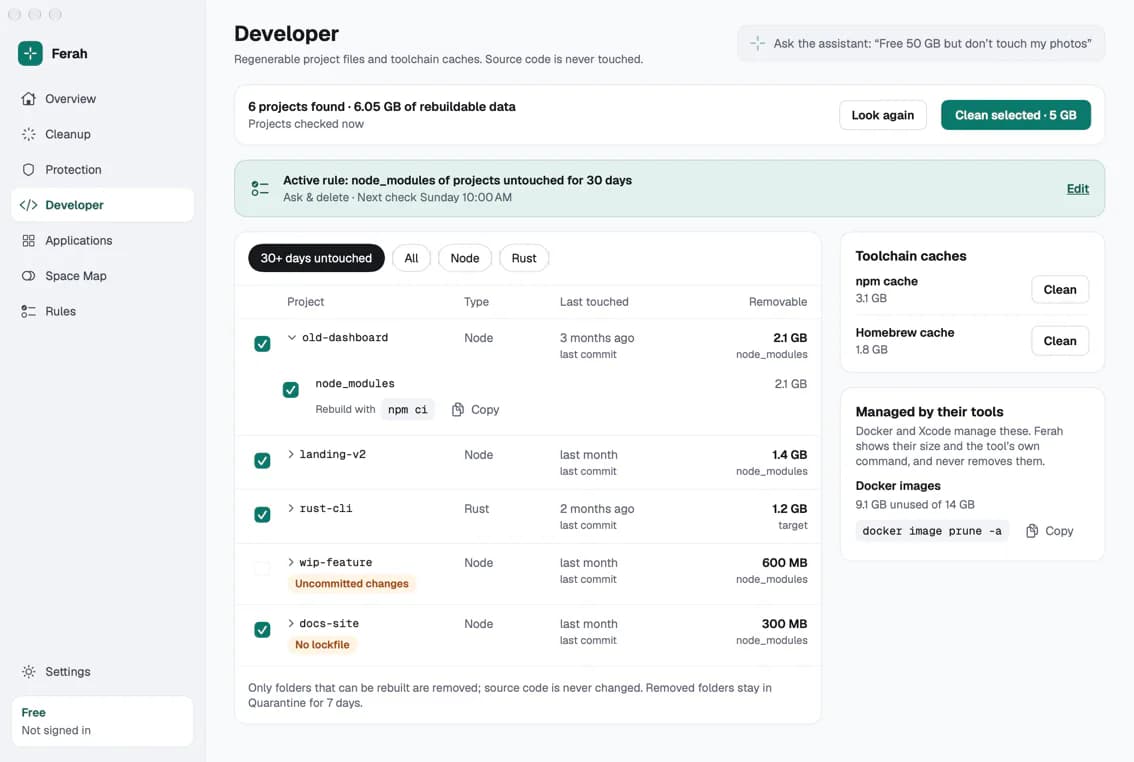
Ferah finds your projects and offers only what a build tool can recreate, such as node_modules, target, DerivedData, .venv or Pods. Your source code is never a target.
package.jsonCargo.tomlPackage.swiftPodfilepubspec.yamlbuild.gradlepyproject.tomlgo.modThe latest of your last commit, your last change to tracked files and the last time you opened the project in VS Code, Cursor, a JetBrains IDE or Xcode.
A project with uncommitted changes is never stale and cannot even be selected. A project without a lockfile gets a badge and never runs in an automatic rule.
Every removed folder keeps the command that brings it back, such as npm ci, cargo build or pod install.
Derived Data and the npm, pnpm, yarn, Homebrew, pip, uv, Cargo and Gradle caches are cleaned through quarantine. Docker images and simulators are shown with their size and the tool's own command, and left to their tools.
07/12Rules
In your own language. Ferah shows what it understood.
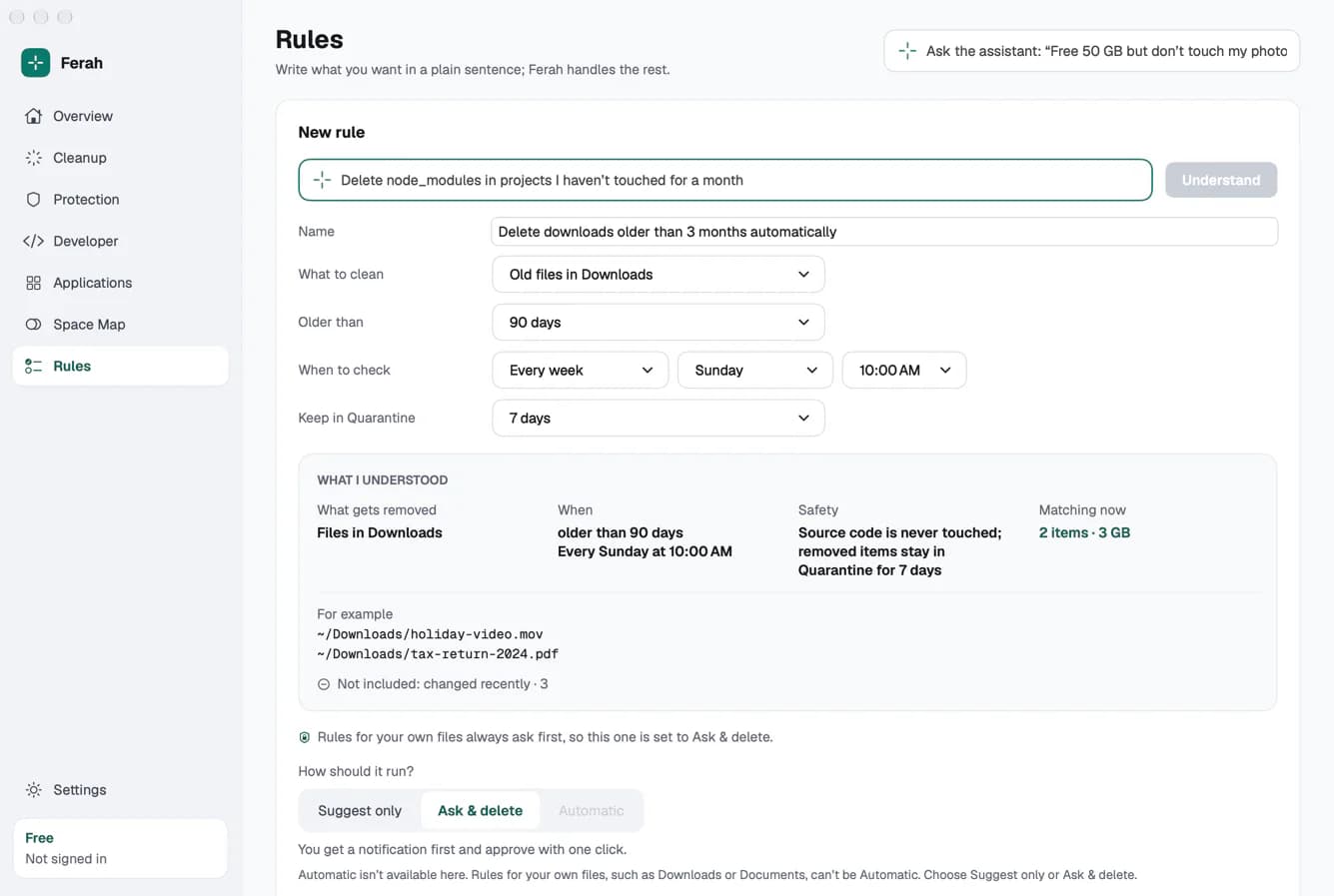
Type what you want in a plain sentence. Ferah turns it into a rule and shows "What I understood": what gets removed, when, which safety checks apply and what matches right now. Nothing runs until you save it.
Delete node_modules in projects I haven't touched for a month
Daily or weekly at a set time, after an event (an installer finished, an app removed, a build archived, Docker stopped, macOS updated) or when free space drops below a limit you set.
Rules for your own files, such as Downloads, Documents, Desktop, large files, installers or mail attachments, can suggest or ask. They can never run automatically.
08/12AI assistant
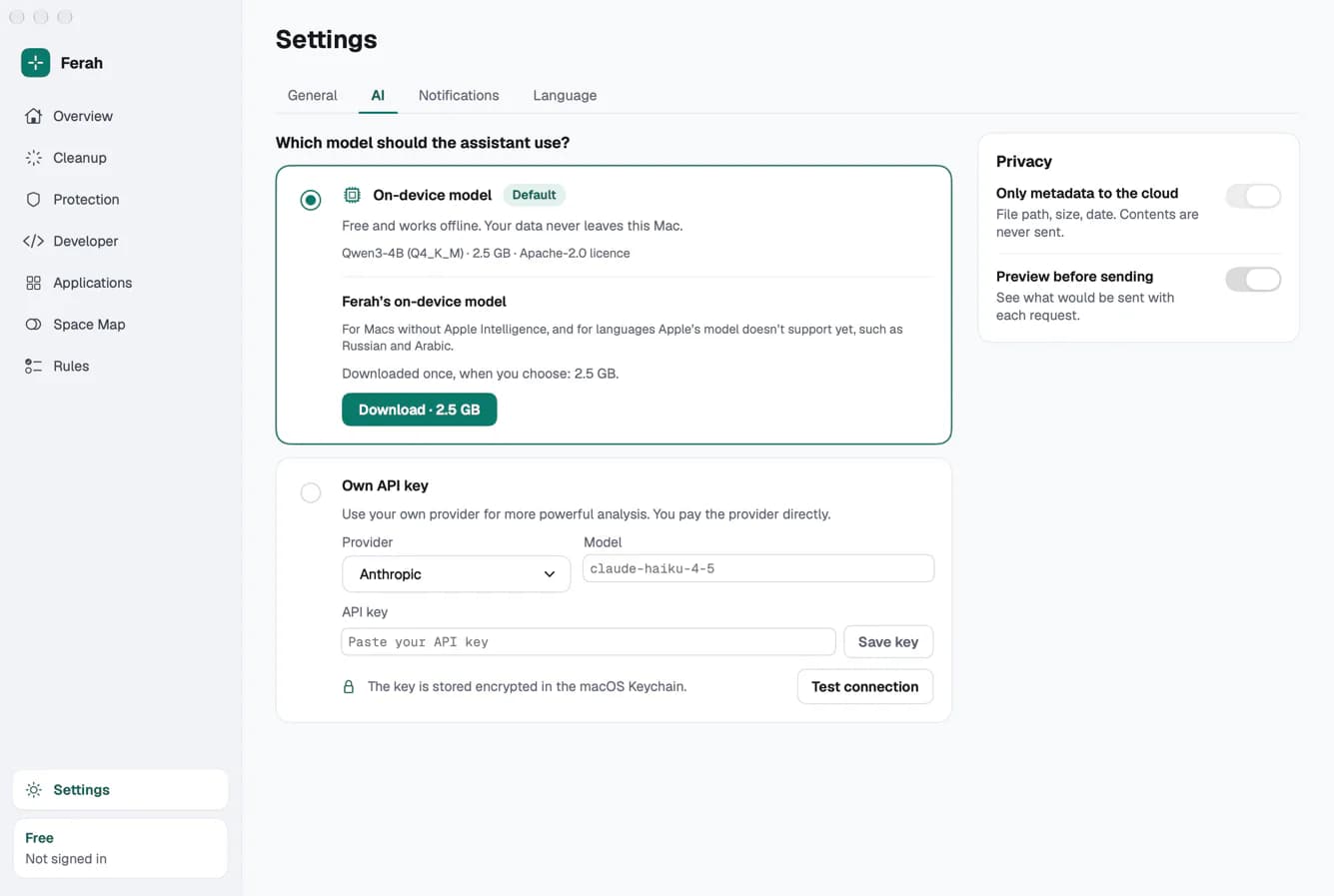
On your Mac by default. With your own key if you want one.
Ask what a folder is, why your Mac feels slow or how to free 50 GB without touching your photos. The assistant explains and proposes. Only Ferah's rules engine acts, and only after you approve.
Apple's on-device Foundation Models where your Mac and language support them, or Ferah's own local model, downloaded once when you choose and run on Apple silicon. Free, and it works offline.
Connect Anthropic, OpenAI, Google, OpenRouter or Ollama on your own Mac. The key is kept in the macOS Keychain and never sent to Ferah.
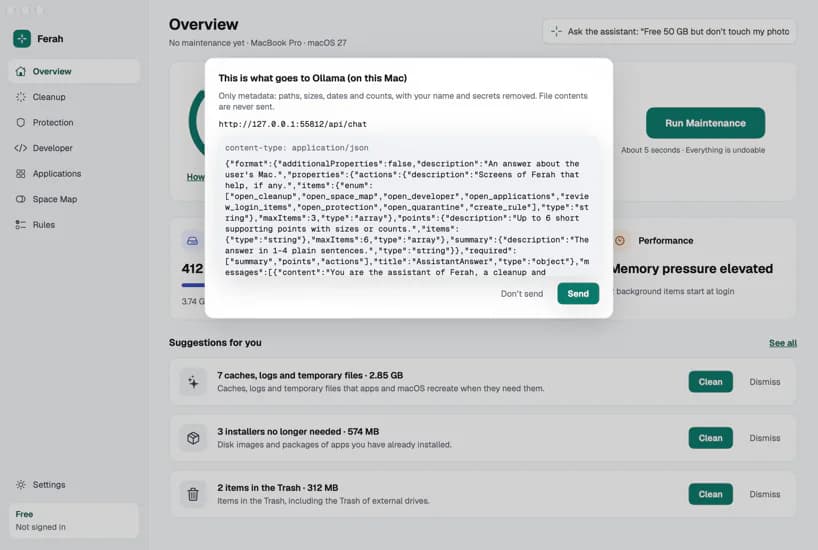
Paths with your user name removed, sizes, dates, file types and counts. Only metadata.
File contents, documents, photos, email, your clipboard, passwords and keys.
On by default: you see the exact request before it leaves your Mac, with secrets removed, and nothing goes out until you press Send.
09/12Siri & menu bar
Ferah is there when you need it, quiet when you don't.
Ask for your health score, free space, what can be cleaned or when Maintenance last ran, open any screen, or run Maintenance. Anything that removes files asks you first and can be undone.
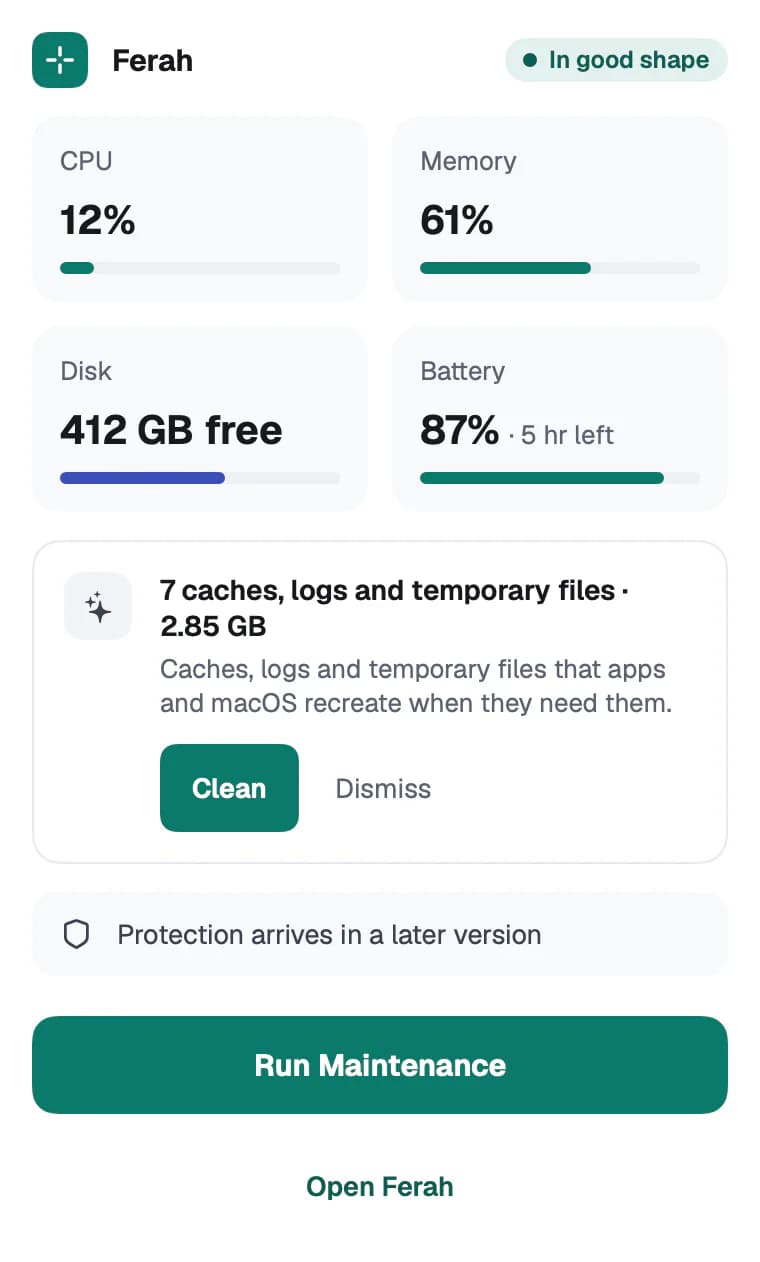
Live CPU, memory, disk and battery, the latest suggestion with Clean, and the Maintenance button. The menu-bar helper is built to use less than 40 MB of memory.
Coming in a later version
10/12Protection
A second opinion next to XProtect and Gatekeeper, not a replacement.
Today's scams trick you into pasting a command, installing a fake AI app or handing over your passwords. Ferah's protection is designed for exactly that and arrives in a later version. The current version does not monitor for threats.
Stops a command a web page tricked you into pasting into Terminal, and explains in plain words what it would have done.
Warns when an app calls itself ChatGPT, Claude or another AI tool but does not come from its real maker, and points you to the official source.
Watches the places infostealers go for: browser data, the Keychain, SSH keys, cloud tokens and crypto wallets.
Checks packages, editor extensions and AI agent add-ons for known tricks and lookalike names, and finds API keys left in plain text.
Notices suspicious behaviour, such as something new quietly setting itself to start with your Mac, even when no virus signature knows it yet.
Scans downloads and apps on your Mac against malware signatures and detection rules, without uploading your files.
Extensions for Safari, Chromium browsers and Apple Mail, and add-ins for Outlook and Thunderbird, check where a link really goes. Nothing you visit or read leaves your Mac.
11/12Privacy
Principles the app is built on, not settings you have to find.
Ferah's servers never receive your files. With your own AI key, only metadata goes to the provider you chose, after you have seen it.
API keys and tokens are stored only in the macOS Keychain. They are never written to logs and never sent to Ferah.
Every removal goes through quarantine first, and nothing is deleted for good before its time runs out, unless you empty it yourself.
Scanning, cleanup, rules and the on-device assistant work without an internet connection. The app collects no usage statistics.
12 languages from day one. Ferah follows your Mac's language, and you can switch at any time.
12/12FAQ
Not yet. Ferah is in development: the Mac version comes first and the Windows version later. There is no public download or beta sign-up on this site yet.
Everything Ferah removes goes to quarantine first and stays there for 7 days by default, so you can put it back. Your own files are never pre-selected, and project source code is never a target.
File contents never do. The assistant runs on your Mac by default. If you connect your own AI key, only metadata such as paths, sizes and dates goes to that provider, and you can see each request before it is sent.
macOS 13 or later, on Macs with Apple silicon or Intel processors. Ferah's local AI model needs Apple silicon and at least 8 GB of memory; on other Macs you can use your own AI key or turn AI off.
Prices will be published at launch. The plan is monthly, yearly and lifetime options for 1 to 5 devices, and a free version that scans and explains everything.
No. Its protection, coming in a later version, is a second opinion next to macOS's own XProtect and Gatekeeper, aimed at the scams and theft that signature scanners miss.
Ferah is made by AtaForge Inc. The name is Turkish and means spacious, airy and relieved.